

Problem library
LiftMaster Troubleshooting
LiftMaster openers are good at telling you what is wrong, if you know where to look. Between the wall control, the sensor LEDs, and the diagnostic blinks on the motor head, most calls narrow down fast.
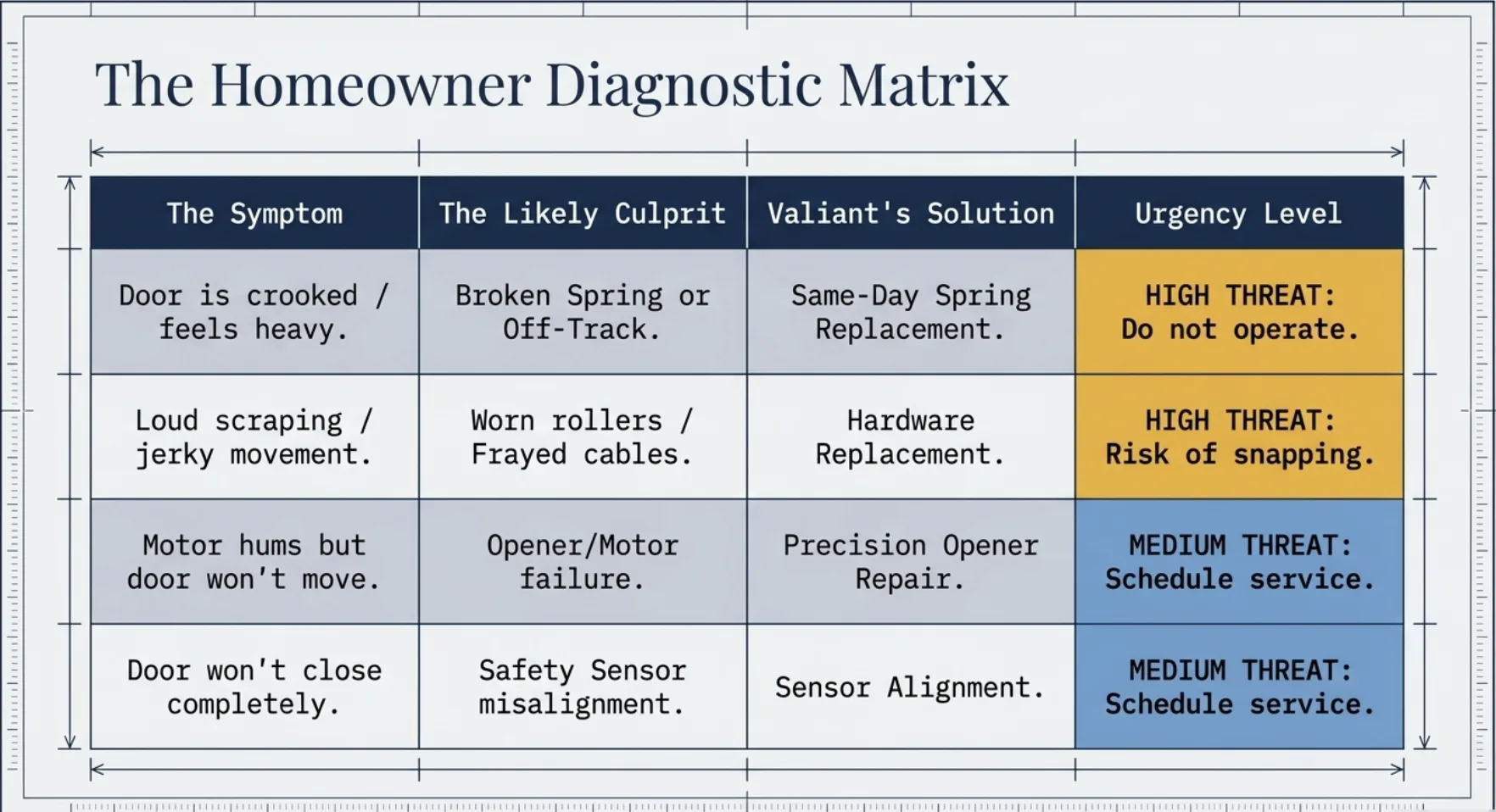
Before Anything: Is It The Opener Or The Door?
An opener that struggles is often a healthy motor fighting a heavy door. With the door closed, pull the release cord and lift the door by hand. If it feels heavy, will not stay at waist height, or lifts crooked, the problem is the counterbalance and no amount of opener adjustment will fix it.
Reconnect the trolley before you go further. Everything below assumes the door itself moves freely by hand.
Wall Control Behavior
The wall panel is wired, so it is the most reliable test point in the system. Press it and note what happens.
- Wall button works, remotes do not: lock mode or a receiver issue.
- Nothing at all from any control: no power at the outlet, a tripped GFCI, or a failed board.
- Motor clicks once: the board is calling for a motor that is not turning.
- Panel lights are dead: check the two low-voltage wires at the terminal screws on the motor head.
Older three-button panels lose contact behind the plate as the buttons wear. If it works when you press hard in one corner, the panel is due.
Lock Mode Trips Up A Lot Of People
LiftMaster wall controls include a lock feature meant for vacations. When it is on, the opener ignores every remote and keypad while the wall button still works normally.
It gets switched on by accident constantly, especially in garages where kids can reach the panel. Hold the lock button for a couple of seconds until the indicator stops flashing, then test a remote. Free fix, and it explains a lot of mysterious calls.
Remotes And Keypads
| Symptom | Likely cause | First move |
|---|---|---|
| One remote weak, others fine | Dying battery | Replace the coin cell |
| Only works within a few feet | Antenna damage or radio interference | Check the hanging antenna wire, look for new LED shop lights |
| All remotes dead, wall button fine | Lock mode or receiver | Clear lock mode, then reprogram one remote |
| Keypad rejects the code | Battery or lost programming | New battery, then reset the PIN |
| Car button stopped after a battery change | In-vehicle system lost its pairing | Re-pair the vehicle to the opener |
Programming steps vary by model and year, so use the learn button procedure printed on your unit. If reprogramming will not take at all, the receiver side of the logic board is the suspect.
Safety Sensors On LiftMaster Units
A blinking overhead light while the door refuses to close under power almost always points at the safety beam circuit. The sending eye's LED normally stays lit with power; the receiving eye's LED indicates whether it sees the beam.
Work in this order: wipe both lenses dry, clear the floor between them, confirm both are at matching height, check that brackets are tight to the track, then inspect the wire runs and terminal screws for staples, splices, and corrosion. Our sensor problems guide has the full LED table.
Do not disable the sensors to get the door closed. That circuit is what stops the door on a person.
Travel Limits And Force
Travel tells the opener where the floor and the ceiling are. Force tells it how hard to push before it gives up.
Symptoms of travel drift are specific: the door stops short of the floor, or hits the floor and rolls back up, or opens only part-way. On many units these are set with buttons on the motor head, on older ones with adjustment screws.
The important caution is on force. If a door needs more force than it used to, something mechanical changed. Turning force up masks a binding track or a weak spring and removes the protection that reverses the door on an obstruction. Find the bind first, then set force to spec.
Diagnostic Blinks And Error Codes
Newer LiftMaster heads flash a diagnostic code on the up or down LED, and the legend is printed on the unit or in the manual. Count the blinks and match them to the chart rather than guessing.
Broadly, codes cluster into four families: safety sensor circuit faults, wall control or wiring faults, motor and RPM sensing faults, and logic board faults. Knowing which family you are in decides whether you are cleaning a lens or ordering a board. Photograph the blinking LED and the model label if you plan to call, since both help.
Battery Backup And Wi-Fi Complaints
California requires battery backup on residential openers sold for installation here, and those batteries are consumables. Expect a few years of life. A chirping unit, a lit battery indicator, or a door that will not move during an outage all point at the battery, not the motor.
Connectivity is a separate track. If the app cannot see the opener but the wall button works, the door hardware is fine. Check that the garage actually has usable Wi-Fi signal at ceiling height, that the router did not change its name or password, and that the unit is still linked in the app. Wi-Fi problems never justify replacing a working opener.
When We Recommend Replacement Instead Of Repair
Parts are available for a lot of LiftMaster history, and we would rather fix yours. Gears, sprockets, trolleys, panels, sensors, and boards are all normal repairs.
The case for replacement is when several major parts are failing on an aging unit, when no battery backup exists and the household needs one, or when the drive type is wrong for the room below a bedroom. If that is where you land, openers and pricing lays out the options, and opener repair covers the alternative.
Opener Resources
LiftMaster Questions
Why did all my remotes stop working at once while the wall button still works?
Lock mode is the most likely answer on a LiftMaster wall control. Press and hold the lock button until the indicator stops flashing. If remotes are still dead, the antenna or receiver logic is the next thing to check.
What does a blinking opener light mean on a LiftMaster?
It typically signals a safety sensor circuit problem. Check both sensor LEDs, the lens surfaces, the bracket aim, and the low-voltage wiring at the motor terminals before assuming the sensors are bad.
Do I have to reset travel limits after a power outage?
Usually not. Travel settings are stored in the logic board. If travel changed after an outage, suspect a surge affecting the board, or a mechanical change such as a stretched chain or a slipping trolley.
Is it worth repairing an older LiftMaster or replacing it?
It depends on the part and the age. Gears, sprockets, boards, and sensors are all serviceable. Once several major components are failing at once on a unit past its useful life, replacement is the more honest recommendation, and we say so.
Ready For A Clear Next Step?
Call (925) 409-4974, request an appointment, or start an instant estimate with photos.
Proof Before Proposal — Documented findings, clear recommendations, and completed-work evidence. Credentials & Housecall Pro recognition · Industry appearance